LLVM is more than enough
A lot of my personal projects and experiments start when I find a new-to-me programming language or platform and make something to play with it. A couple weeks ago, when I was rebooting my computer, I had the idea to explore programming in the UEFI environment. I was familiar with UEFI as part of installing systemd-boot and GRUB to boot Linux, as well as using OpenCore to boot macOS, but I knew nothing about writing code to run atop UEFI.
Although bootloaders are clearly the primary use case for writing UEFI applications, much more is possible. The firmware on a motherboard can implement protocols allowing UEFI applications to use everything ranging from Bluetooth to HTTP to graphical output. Once I saw all that, I knew I had to try making a game or two with it! Before I could get started on that, though, I needed to figure out how to build a UEFI application.
Normal ELF binaries (as used by Linux and the BSDs, among others) don’t run on UEFI, nor do macOS Mach-O executables. Instead, UEFI uses the COFF-based PE format like Windows (PE32+ more specifically). Because of this, if you’re programming on something Unix-like, you can’t invoke your compiler and linker as normal and expect it to work.
Two toolchains are commonly used for writing and building UEFI applications. The most feature-complete option is Intel’s TianoCore EDK II, which is both the reference implementation of UEFI itself and a development environment for writing UEFI applications. For my experimentation purposes, it looked a little too big and complicated. The more lightweight alternative is GNU EFI, which is used by systemd-boot and a handful of other Linux bootloader projects. GNU EFI works by building an ELF binary, linking it with a self-relocator stub, then converting the whole thing into a PE32+ executable that can be loaded by the UEFI firmware. Although I find that approach impressive (it’s a very creative solution and I’m impressed that it works well), it seemed a little hacky for my tastes. Additionally, the version of objcopy shipped by Debian does not list EFI applications among its supported targets, meaning I would have to compile my own if I wanted to use GNU EFI.
After investigating the EDK2 and GNU EFI options, I came across a blog post by notable FOSS developer David Rheinsberg showing that it’s actually quite straightforward to compile and link UEFI applications with Clang and LLD. No additional software is required as long as you provide headers for UEFI (which can come from EDK2 or even just copy-pasted out of the UEFI specification itself). This sounded like a great way to learn the most about UEFI development and spend the least time messing with a complicated toolchain.
One downside of using this simpler method is that no extra helper functions or wrappers come for free. Both EDK2 and GNU EFI come with additional runtime libraries that make it easier to write applications for UEFI (things like a print function that wraps UEFI’s basic console output facility, for instance). For my educational purposes, I decided that forgoing this extra help would be okay.
Using the CFLAGS and LDFLAGS from that post, I created a Makefile and then wrote a bootable Snake game to get a feel for UEFI development. For my UEFI headers, I used Warren Mann’s collection, which worked great. Here’s the Makefile in its entirety:
CC = clang
CFLAGS = -Wall -Wextra -O2 --target=x86_64-unknown-windows -ffreestanding -fshort-wchar -mno-red-zone -mno-stack-arg-probe -DEFI_PLATFORM=1
LDFLAGS = --target=x86_64-unknown-windows -nostdlib -Wl,-entry:efi_main -Wl,-subsystem:efi_application -fuse-ld=lld-link
INCLUDES = -I./external/yoppeh-efi

OBJ = main.o
TARGET = games.efi
ISO = games.iso
IMG = efiboot.img

all: $(ISO)

%.o: %.c
	$(CC) $(CFLAGS) $(INCLUDES) -o $@ -c $<

$(TARGET): $(OBJ)
	$(CC) $(LDFLAGS) -o $@ $^

$(ISO): $(TARGET)
	mkdir -p iso_root/EFI/BOOT
	cp $(TARGET) iso_root/EFI/BOOT/BOOTX64.EFI

	dd if=/dev/zero of=$(IMG) bs=1M count=40
	/sbin/mkfs.vfat -F 32 $(IMG)
	mmd -i $(IMG) ::/EFI
	mmd -i $(IMG) ::/EFI/BOOT
	mcopy -i $(IMG) $(TARGET) ::/EFI/BOOT/BOOTX64.EFI

	# required for xorriso to find it with the -e flag
	cp $(IMG) iso_root/

	xorriso -as mkisofs -R -J -V "EFI_APP" \
		-o $@ \
		-e $(IMG) \
		-no-emul-boot \
		-isohybrid-gpt-basdat \
		-append_partition 2 0xef $(IMG) \
		-appended_part_as_gpt \
		-partition_offset 16 \
		./iso_root

.PHONY: clean
clean:
	rm -rf $(OBJ) $(TARGET) $(ISO) $(IMG) iso_root
You’ll notice that most of this Makefile is dedicated to building a bootable ISO. QEMU isn’t picky about what ISOs it will boot from, but getting real hardware to boot to my UEFI application took some trial and error. I also added the compiler flag -mno-stack-arg-probe, which prevents Clang from trying to reference a function called __chkstk, which is used on Windows to ensure that there’s enough stack space for local variables, but didn’t seem to be defined in UEFI. This flag isn’t required for a “Hello, world!”, but not having it will result in a linker error if you use a substantial amount of stack space.
To achieve a short edit-compile-run cycle, I have done my testing using UTM, which is effectively an easy-to-use, Mac-native QEMU wrapper. I just created an x86_64 PC (emulated since I have an Apple silicon MacBook, but virtualization could work too), then put my ISO in its virtual CD/DVD drive. Because my UEFI application is at the path \EFI\BOOT\BOOTX64.EFI on the EFI system partition within the ISO, the emulated machine’s firmware boots it automatically.
Here’s what my Snake game looked like running in the emulator:
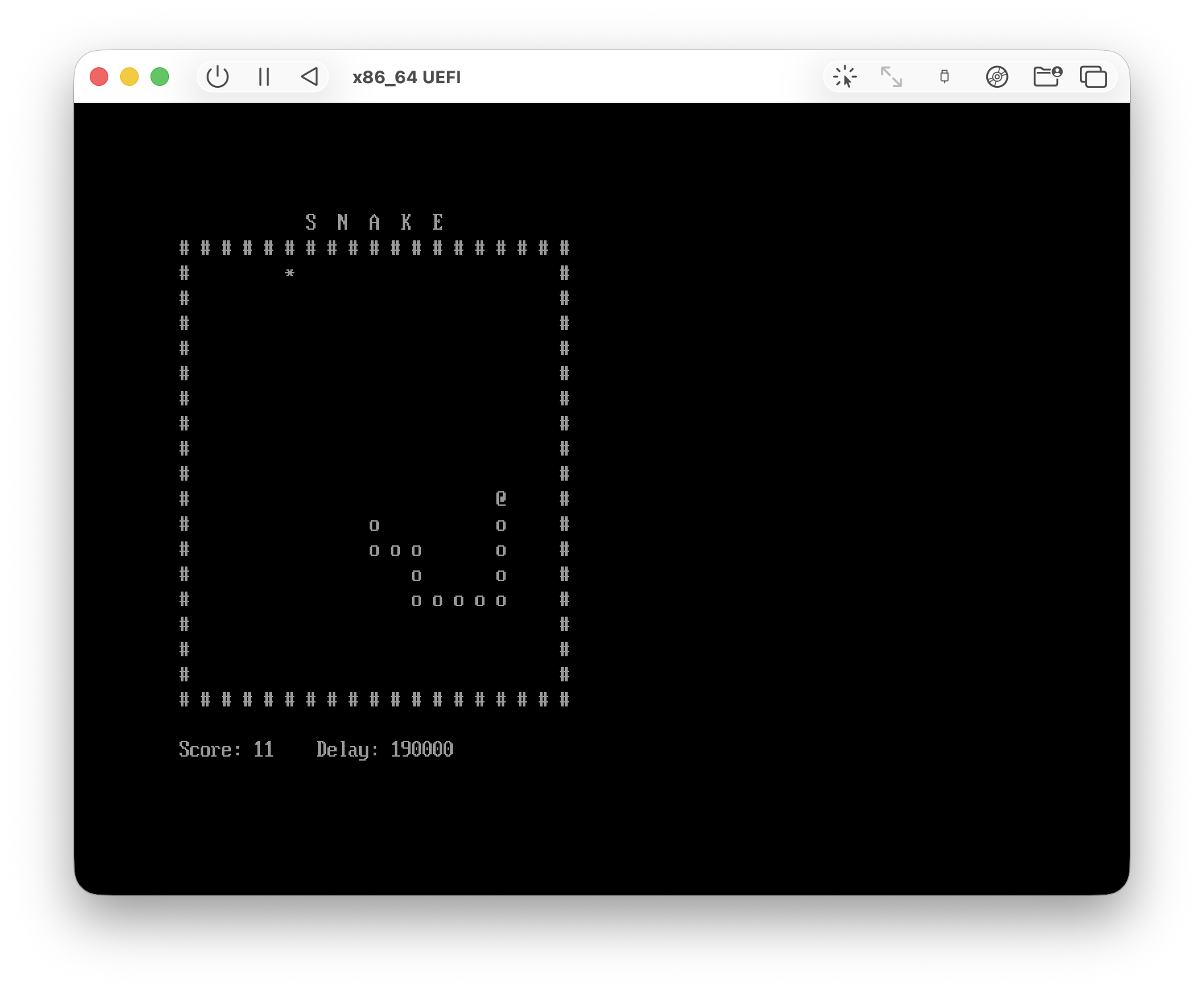
Later, I got it to run on real hardware (an old ThinkPad X220). Although QEMU uses TianoCore as its UEFI firmware (which is the reference implementation, as I mentioned earlier), real PCs generally use firmware from companies known as “independent BIOS vendors” which often don’t implement all the UEFI protocols and generally have some quirks and bugs with the ones they do support. I had to change my xorriso flags substantially, but eventually I got a combination that booted on my particular hardware (and should theoretically work on most x86_64 UEFI machines).
I learned lots about UEFI through the process of writing my Snake game and getting my Makefile to produce a bootable ISO. It’s great that LLVM’s flexibility makes building programs for UEFI a breeze. As my next step, I’m currently laying the groundwork to port my raycasting-based 3D engine to UEFI. Someone else already made DOOM run in UEFI, so it should be possible!
I hope my Makefile provides a useful jumping-off point for someone else’s cool project!